11:03 AM PowerChef account/data deletion policy |
PowerChef – Account & Data Deletion Policy🔹 How to Delete Your Account from the AppIf you have a PowerChef account and want to permanently delete your data:
This will:
Once deleted, your account and data cannot be recovered. 🔹 If You Can’t Access the AppIf you’re unable to log in or access the app, you can request account deletion manually. Please send an email to:
Include the email or phone number associated with your PowerChef account so we can verify and process your deletion securely. 🔹 Data Retention PolicyAll user data (profile, recipes, favorites, and preferences) are permanently deleted from Firebase servers once your account is deleted. We do not retain any personal data after deletion. |
|
|
Related blogs
You may also like to see:
| [2014-02-13] | [Technical Solution] |
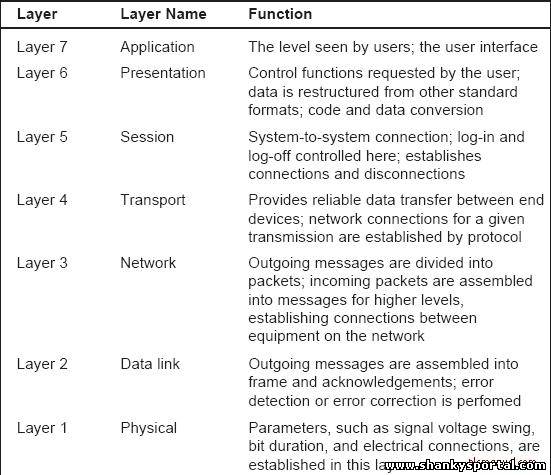 ISO/OSI Network Model ISO/OSI Network Model | |
| [2014-02-06] | [Technical Solution] |
| | |
| [2014-01-20] | [Technical Solution] |
| | |
| [2014-09-27] | [Technical Solution] |
 TRACERT command in Windows Command Line TRACERT command in Windows Command Line | |
| [2014-02-24] | [Technical Solution] |
| | |
| Total comments: 0 | |